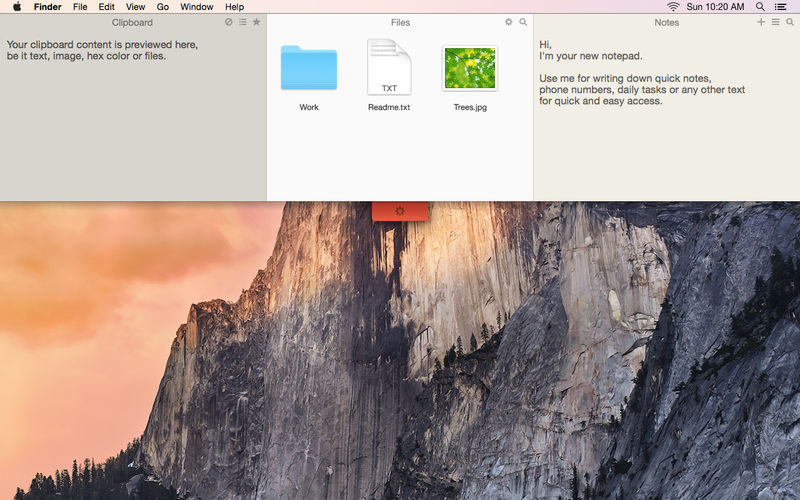
Unclutter is a convenient, always-accessible space on your desktop for storing notes, files, and clipboard snippets in one place.
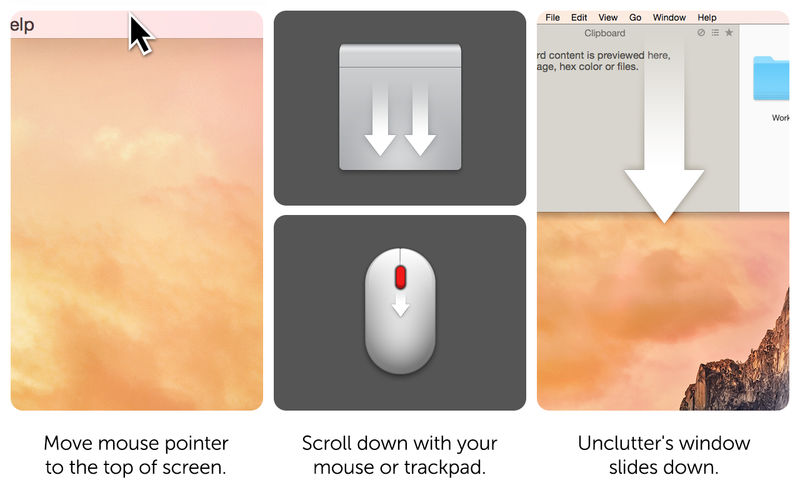
To open Unclutter, simply move your pointer to the very top of the screen and scroll down. You can quickly drag items from other applications to the top of the screen to store them in Unclutter, keeping your workspace clean and your essentials within easy reach.
Key Features:
Instant, customizable access—even in full-screen mode
Seamless support for multiple displays
Built-in file storage to keep your desktop free of temporary clutter
Quick notes for capturing ideas and reminders on the fly
Clipboard manager to track, browse, and reuse copied content
Draggable cards that can stay visible on top of other windows
Automatic sync of files and notes across Macs via Dropbox
Optimized for Retina displays
Main Features:
Instant, configurable access, even while working in full-screen mode
Full multi-display support for seamless use across multiple screens
File Storage to keep your desktop clean from temporary files
Notes for quickly writing down ideas, reminders, or to-dos
Clipboard Manager to track everything you copy and paste and easily browse clipboard history
Draggable cards that can stay on top of other windows for quick reference
Automatic syncing of files and notes across all your Macs via Dropbox
Retina display support for crisp, high-resolution visuals